
May 2013 - AURA
Typography Options

Typography Options

Typography Options

Drop Caps

L orem ipsum dolor sit amet, consectetur adipiscing elit. Mauris tristique lobortis orci ac lacinia. Fusce eu purus eget diam vehicula auctor nec eu elit. Morbi consequat facilisis orci vel malesuada. Donec ultrices molestie sollicitudin. Morbi consequat facilisis orci vel malesuada. Donec ultrices molestie sollicitudin. Mauris tristique lobortis orci ac lacinia. Mauris tristique lobortis orci ac lacinia.

Apply a drop cap with a wrapping span class as follows: <span class=”firstcharacter”>L</span>orem ipsum

L orem ipsum dolor sit amet, consectetur adipiscing elit. Mauris tristique lobortis orci ac lacinia. Fusce eu purus eget diam vehicula auctor nec eu elit. Morbi consequat facilisis orci vel malesuada. Donec ultrices molestie sollicitudin. Morbi consequat facilisis orci vel malesuada. Donec ultrices molestie sollicitudin. Mauris tristique lobortis orci ac lacinia. Mauris tristique lobortis orci ac lacinia.

Apply a drop cap with a wrapping span class as follows: <span class=”firstcharacter2″>L</span>orem ipsum

Porem ipsum dolor sit amet, consectetur adipiscing elit. Mauris tristique lobortis orci ac lacinia. Fusce eu purus eget diam vehicula auctor nec eu elit. Morbi consequat facilisis orci vel malesuada. Donec ultrices molestie sollicitudin. Morbi consequat facilisis orci vel malesuada. Donec ultrices molestie sollicitudin. Mauris tristique lobortis orci ac lacinia. Mauris tristique lobortis orci ac lacinia.

Apply a drop cap with a class on a wrapping paragraph tag as follows: <p class=”drop_class”>Porem ipsum</a>

Porem ipsum dolor sit amet, consectetur adipiscing elit. Mauris tristique lobortis orci ac lacinia. Fusce eu purus eget diam vehicula auctor nec eu elit. Morbi consequat facilisis orci vel malesuada. Donec ultrices molestie sollicitudin. Morbi consequat facilisis orci vel malesuada. Donec ultrices molestie sollicitudin. Mauris tristique lobortis orci ac lacinia. Mauris tristique lobortis orci ac lacinia.

Apply a drop cap with a class on a wrapping paragraph tag as follows: <p class=”drop_class2″>Porem ipsum</a>

Social Icons


Ion Icons must be enabled to use these icons.

<a href="" class="social_icon ion-social-facebook"></a>
<a href="" class="social_icon ion-social-twitter"></a>
<a href="" class="social_icon ion-social-googleplus"></a>
<a href="" class="social_icon ion-social-rss"></a>
<a href="" class="social_icon ion-social-pinterest"></a>

Notifications

This is a styled box. Use <div class=”black_box”>Your content goes here!</div>

This is a styled box. Use <div class=”gray_box”>Your content goes here!</div>

This is a styled box. Use <div class=”red_box”>Your content goes here!</div>

This is a styled box. Use <div class=”blue_box”>Your content goes here!</div>

This is a styled box. Use <div class=”green_box”>Your content goes here!</div>

This is a styled box. Use <div class=”yellow_box”>Your content goes here!</div>

This is a styled box. Use <div class=”orange_box”>Your content goes here!</div>

Images

This is an image with the “boxed” class applied:

This is an image with the “boxed_black” class applied:

This is an image with the “padded” class applied:

This is an image with the “full_width” class applied. This can also be done automatically in the template configuration. Be sure to review our Vertex Guide here for other full width image options.

Headings

Heading 1

Heading 2

Heading 3

Heading 4

Heading 5

Ion Icons

<div class="icon_outer_wrap">
<div class="icon_hover">
<a href="" class="ion-link icon_element"></a>
</div>
<div class="icon_non_hover">
<span class="ion-headphone icon_element"></span>
</div>
</div>

Click here for more icon examples

Dates

AUG
22

Top Sample Text
When: August 22, 2014 at 7:00pm

<div class="date_outer_wrap">
<div class="date_wrapper">
<div class="date_top">
AUG
</div>
<div class="date_bottom">
22
</div>
</div>
<div class="date_text_wrap">
<span class="date_text1"><a href="">Top Sample Text</a></span>
<span class="date_text2">When: August 22, 2014 at 7:00pm</span>
</div>
<div style="clear:both"></div>
</div>

Overlay


team3

Michelle Wright

Senior Developer

Dummy Text

team3


Photos credits by Daniele Zedda, JohnONolan, Daniele Zedda, Daniele Zedda, AllansBrain, rolands.lakis

Example of code used above. Notice on the first DIV there is a “four”. You can enter one, two, three, four, five and six depending on how many team members you want on one row (Be sure to keep that space before the number too):

<div class=”overlay_outter four”>
<div class=”overlay_inner”>
<div class=”overlay_hover_outer”>
<div class=”overlay_hover_inner”>
<div class=”overlay_socialicons”>
<a class=”overlay_facebook” href=”https://www.facebook.com/shape5.templates” target=”_blank”></a>
<a class=”overlay_twitter” href=”https://twitter.com/shape_5″ target=”_blank”></a>
</div>
</div>
<img src=”http://www.shape5.com/demo/images/general/team/team1.jpg” alt=”team1″/>
</div>
<br>
Mike Summerfield
<br>
<span style=”color:#a8a8a8;”>CEO/Owner</span>
<br>
</div>
</div>

Misc

<a> With readon class applied:

readon

<span> With uppercase class applied:

uppercase

<span> With lowercase class applied:

lowercase

This is a sample blockquote. Use <blockquote><p>Your content goes here!</p></blockquote> to create a blockquote.

This is a sample code div. Use <div class=”code”>Your content goes here!</div> to create a code div.

#s5_code { width: 30px; color: #fff; line-height: 45px; }

  1. This is an Ordered List
  2. Congue Quisque augue elit dolor nibh.
  3. Condimentum elte quis.
  4. Opsum dolor sit amet consectetuer.
  • This is an Unordered List
  • Congue Quisque augue elit dolor nibh.
  • Condimentum elte quis.
  • Opsum dolor sit amet consectetuer.
  • This is an Unordered List with class ul_arrow
  • Congue Quisque augue elit dolor nibh.
  • Condimentum elte quis.
  • Opsum dolor sit amet consectetuer.
  • This is an Unordered List with class ul_star
  • Congue Quisque augue elit dolor nibh.
  • Condimentum elte quis.
  • Opsum dolor sit amet consectetuer.
  • This is an Unordered List with class ul_bullet
  • Congue Quisque augue elit dolor nibh.
  • Condimentum elte quis.
  • Opsum dolor sit amet consectetuer.

The following list will support plain text such as numbers of ion icons, class=”ul_circle_content”:

  • 01Lorem ipsum dolor sit amet, consectetur adipiscing elit. Sed ut mattis quam. Suspendisse tempor mollis porta. Quisque consequat justo risus, et venenatis erat consectetur sit amet. Curabitur varius tortor metus, non convallis felis fermentum sed. Nam varius justo nulla, et ultricies augue venenatis ut. Proin tempor aliquam dapibus. Pellentesque euismod vehicula est, a euismod lacus feugiat sit amet.
  • 02Lorem ipsum dolor sit amet, consectetur adipiscing elit. Sed ut mattis quam. Suspendisse tempor mollis porta. Quisque consequat justo risus, et venenatis erat consectetur sit amet. Curabitur varius tortor metus, non convallis felis fermentum sed. Nam varius justo nulla, et ultricies augue venenatis ut. Proin tempor aliquam dapibus. Pellentesque euismod vehicula est, a euismod lacus feugiat sit amet.
  • 03Lorem ipsum dolor sit amet, consectetur adipiscing elit. Sed ut mattis quam. Suspendisse tempor mollis porta. Quisque consequat justo risus, et venenatis erat consectetur sit amet. Curabitur varius tortor metus, non convallis felis fermentum sed. Nam varius justo nulla, et ultricies augue venenatis ut. Proin tempor aliquam dapibus. Pellentesque euismod vehicula est, a euismod lacus feugiat sit amet.
  • Lorem ipsum dolor sit amet, consectetur adipiscing elit. Sed ut mattis quam. Suspendisse tempor mollis porta. Quisque consequat justo risus, et venenatis erat consectetur sit amet. Curabitur varius tortor metus, non convallis felis fermentum sed. Nam varius justo nulla, et ultricies augue venenatis ut. Proin tempor aliquam dapibus. Pellentesque euismod vehicula est, a euismod lacus feugiat sit amet.

<li><span class="circle_item">01</span>Lorem ipsum dolor sit amet,
consectetur adipiscing elit. Sed ut mattis quam. Suspendisse tempor mollis porta.
Quisque consequat justo risus, et venenatis erat consectetur sit amet. Curabitur
varius tortor metus, non convallis felis fermentum sed. Nam varius justo nulla,
et ultricies augue venenatis ut. Proin tempor aliquam dapibus. Pellentesque
euismod vehicula est, a euismod lacus feugiat sit amet.</li>

<li><span class="circle_item"><i class="ion-star"></i></span>Lorem
ipsum dolor sit amet, consectetur adipiscing elit. Sed ut mattis quam.
Suspendisse tempor mollis porta. Quisque consequat justo risus, et venenatis
erat consectetur sit amet. Curabitur varius tortor metus, non convallis felis
fermentum sed. Nam varius justo nulla, et ultricies augue venenatis ut. Proin
tempor aliquam dapibus. Pellentesque euismod vehicula est, a euismod lacus
feugiat sit amet.</li>

The following list will support lists up to number 9, add the following class to the UL wrapping the below LI elements, class=”ul_numbers”:

  • This is a sample styled number list <li class=”li_number1″>Your content goes here!</li>
  • This is a sample styled number list <li class=”li_number2″>Your content goes here!</li>
  • This is a sample styled number list <li class=”li_number3″>Your content goes here!</li>
  • This is a sample styled number list <li class=”li_number4″>Your content goes here!</li>

Price Table

Basic

$49/per month

Unlimited Space & Traffic
99.9% Server Uptime
24/7 Customer Care
30 Days Money Back

Premium

$99/per month

Unlimited Space & Traffic
99.9% Server Uptime
24/7 Customer Care
30 Days Money Back
FREE Domain Name

To use the price table on your site grab the following example code below and add to your site. The price table is fully responsive and can display up to 7 price columns. Once you have determined the number of columns you will be using set the wrapper div to the number of columns that you’ve added. You can use the wrapping classes of “s5_pricetable_1” to “s5_pricetable_7”.

<div class=”s5_pricetable_3″>

<div class=”s5_pricetable_column”>
<div class=”s5_pricetable_column_padding”>
<div class=”s5_title”>Basic</div>

<span class=”dollarsign”>$</span><span class=”price”>49</span><span class=”month”>/per month</span>

<div class=”s5_options”>
Unlimited Space & Traffic<br>
99.9% Server Uptime<br>
24/7 Customer Care<br>
30 Days Money Back<br><br>
</div>

<div class=”s5_horizontalrule”></div>
<div class=”s5_buttoncenter”><a class=”button s5_pricetable” href=”#”>Choose</a></div>

</div>
</div>

<div class=”s5_pricetable_column recommended”>
<div class=”s5_pricetable_column_padding”>
<div class=”s5_title”>Standard</div>

<span class=”dollarsign”>$</span><span class=”price”>79</span><span class=”month”>/per month</span>

<div class=”s5_options”>
Unlimited Space & Traffic<br>
99.9% Server Uptime<br>
24/7 Customer Care<br>
30 Days Money Back<br>
FREE Domain Name<br>
Personal Concierge
</div>

<div class=”s5_horizontalrule”></div>
<div class=”s5_buttoncenter”><a class=”button s5_pricetable” href=”#”>Choose</a></div>

</div>
</div>

<div class=”s5_pricetable_column”>
<div class=”s5_pricetable_column_padding”>
<div class=”s5_title”>Premium</div>

<span class=”dollarsign”>$</span><span class=”price”>99</span><span class=”month”>/per month</span>

<div class=”s5_options”>
Unlimited Space & Traffic <br>
99.9% Server Uptime<br>
24/7 Customer Care<br>
30 Days Money Back<br>
FREE Domain Name

</div>

<div class=”s5_horizontalrule”></div>
<div class=”s5_buttoncenter”><a class=”button s5_pricetable” href=”#”>Choose</a></div>

</div>
</div>

<div style=”clear:both;”></div>
</div>

Responsive YouTube and Vimeo Videos

Make any Youtube, Vimeo, etc video you embed to your site work with responsive by wrapping with a DIV with a class of “s5_video_container”. The below Youtube Video will shrink when the area its contained in gets too small for it:

Tool Tips

Note – The tool tips script is by default disabled. If you wish to use it you must enable this script in the template's configuration area. This also includes site shaper installations.


Demo 1:


Demo 2:

The Template’s Settings

This template comes loaded with options that you can use to customize your site exactly how you want it. Here's how to get to these custom settings:

  • 01In the backend of Joomla go menu item Extensions/Template Manager.
  • 02Click on the title of the template.
  • 03This will bring you to the template manager screen where you can edit the template's parameters.
  • 04Click save when you are done

I like what I see! I want to JOIN TODAY.

Template Specific Options

This template is built on the very powerful S5 Vertex Framework, which comes packed with amazing features! Learn More About Vertex…

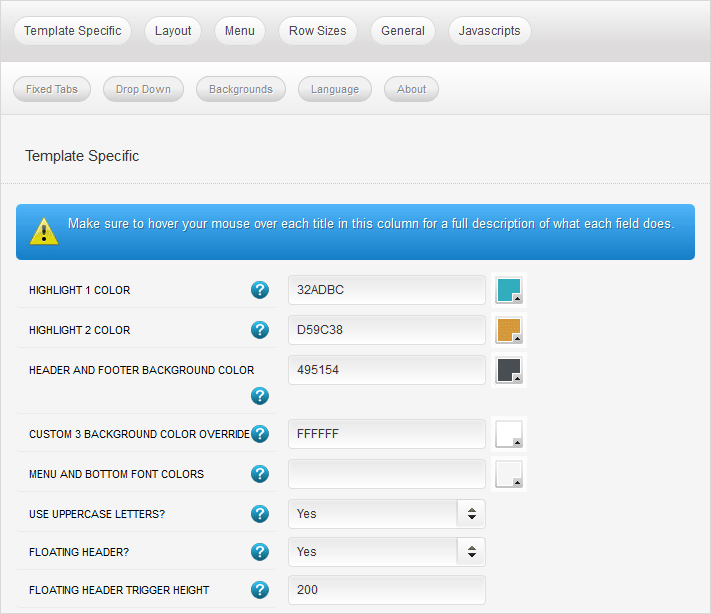
Every template built on Vertex also comes with its own unique template specific options applicable to that particular template such as highlight colors, social icons, and much more. These features are in addition to the standard functions of Vertex, and are still controlled through the very user friendly interface of Vertex. This page will document the features specific to this template.

Template Specific Configuration Interface of Vertex

Below is a screenshot that shows all the template specific features available in the user friendly Vertex admin:

Custom Highlight Colors

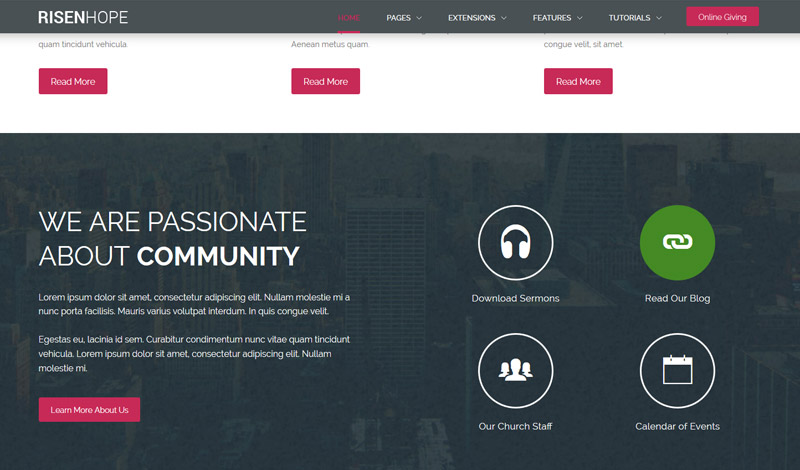
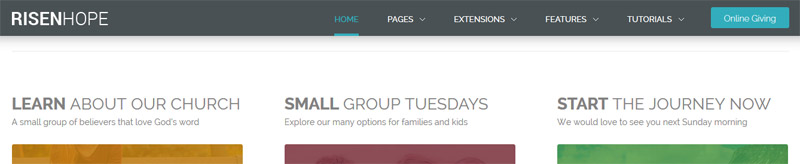
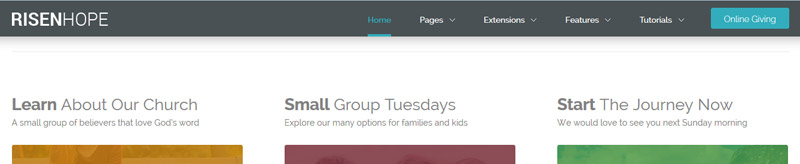
Stylize your site with any color you want. Set your own custom color scheme with the built in highlight color. There are 2 custom highlight colors you can set. These colors control menu items, titles, buttons, hover over effects, backgrounds, and much more. You can set these colors to any color that you want. Below is an example so you can see how this works.

Custom_1, Custom_2 and Custom_3 Positions

This template contains three custom positions. custom_1 contains the Online Giving button found in the header, you can publish any content you wish to this area but due to its size it should remain limited. custom_2 contains the S5 Image and Content Fader module. Whenever this module is published and modules are published to the top_row1 area, the top_row1 area will overlap the custom_2 position as shown on the homepage. custom_3 is found directly under the the top_row1 area and it contains the S5 Tab Show module.

Header and Bottom Color

By default the header color is a dark grey, however you can change this to any color you want, along with the font color that shows on top of it for the menu. These colors also effect the bottom row and the custom_3 position. Alternatively, you can control custom_3 with an override color, because it is intended to be dark with white text.

Uppercase Letters

Choose to enable or disable uppercase letters on most menu items, buttons, titles and more.

Floating Header

This template comes with the ability to enable or disable a floating header and menu area. The header will automatically decrease in size and stay at the top of the website at whatever trigger height you set it to. This is a great way for your users to easily navigate your website! Note – this feature does disable for small tablets and mobile devices.

Stock Photography

All content and images shown on this site is for demo, presentation purposes only. This site is intended to exemplify a live website and does not make any claim of any kind to the validity of non-Shape5 content, images or posts published. Stock photography and icons are often purchased from shutterstock.com for this demo only, and is not included with this template. Occasionally open source images are used as well, but are also not included, eg: unsplash.com. You may not use these items for your own use without first purchasing them from their copyright owner. Links will be provided for some of these items if you wish to purchase them from their copyright owners or download them from their sources.

Site Shapers

So what are Site Shapers? They are quick installs of Joomla combined with all the modules, content, etc used on our demo, excluding stock photography. Within a few minutes you can have your site up, running and looking just like our demo. No more importing SQL dumps and installing modules. Just head on over to the download section of this template and grab a Site Shaper. Simply install the Site Shaper like any other Joomla installation, it's that easy!

How to setup a Site Shaper

  • 01Login to your cpanel or your server admin panel.
  • 02Locate the area where your databases are (usually labeled Mysql Databases)
  • 03Create a new database
  • 04Next create a new database user and assign it to this newly created database in the previous step
  • 05You will then need to extract the site shaper to either a folder on your server or the root directory such as WWW. NOTE: if you already have a website in the root of your WWW folder, we suggest creating a new folder and extract the site shaper there. If your cpanel does not have an extract option or you cannot find it, you may also extract the contents of your site shaper in to a folder on your desktop and upload all the files via an ftp client to your server.
  • 06Next, navigate to the url where you extracted the site shaper via your web browser.
  • 07Continue through each screen until you reach the below screenshot:

  • 08At the above screen be sure to enter localhost as shown, continue to fill in the following text fields with your newly created database and username information
  • 09Follow through the rest of the site shaper setup and click the install sample data at the last screen and the installation is complete! (be sure to rename/remove the installation directory after finishing the install)

Search Engine Optimized

SEO – Get your site noticed!

Not only is this template beautifully designed but it is great for search engine optimization as well! What is SEO? It is simple the act of altering a web site so that it does well in the organic, crawler-based listings of search engines such as google.com. How does this template accomplish this? It's simple, the majority of your most valuable content is found in the main body of your site, through css we are able to alter the layout of the site and call the main content before the left and right columns are called. This allows for your content to be found first by search engines before it reaches your other content, which is vital in search engine optimization. This is a common feature this can be done with almost all of Shape 5 templates as well.

I like what I see! I want to JOIN TODAY.

Sample Article 3

Lorem diceret ut vim, qui ipsum dolor sit amet, minim menandri eam at, usu ex modo copiosae. Cibo atomorum ocurreret ei qui, causae fabellas sapientem quo an, ut nemore aperiri appellantur nec.Lorem diceret ut vim, qui ipsum dolor sit amet, minim menandri eam at, usu ex modo copiosae. Cibo atomorum ocurreret ei qui, causae fabellas sapientem quo an, ut nemore aperiri appellantur nec. Lorem diceret ut vim, qui ipsum dolor sit amet, minim menandri eam at, usu ex modo copiosae. Cibo atomorum ocurreret ei qui, causae fabellas sapientem quo an, ut nemore aperiri appellantur nec.

Ei primis assentior deseruisse vel. Ne est magna dolorem temporibus. Ne latine molestiae qui, an eum soluta dicunt vulputate, augue ignota sadipscing mel ut. Prompta constituam usu in.

Idque veniam pri et, no suscipit probatus voluptatibus sea. Odio laudem persius ex has. Percipit atomorum ne mea. Ad nec veniam nominavi accusata, an quo recteque assueverit, ex his vocibus accusamus.

Pro eu integre labitur detraxit, aperiri eruditi prodesset eum eu. Dolorum sapientem ei sit, duo no diam sensibus accommodare. His ex quaeque convenire, an denique cotidieque vix, eos epicurei urbanitas in. Mea ea fabulas suscipit efficiendi, quo ea soluta timeam assueverit. Paulo labore euismod ei vel, vim quod everti an.

Qui ea quod liber, vis mazim nostro id. Id omnis tempor duo, liber legendos cu duo. Mei nominavi honestatis te, feugiat vulputate eloquentiam eam in. Brute melius mea at. Te qui ferri debet noluisse, mea minimum aliquando ea, ea possit perpetua vix.

Labore perpetua tincidunt per cu. Ne diam conceptam inciderint mea, no mea vidit menandri. Omnium lucilius ad sed, ea eirmod noluisse euripidis vel. Ex sed detraxit corrumpit, sea graeco recteque at. Ut mundi adolescens quo.

Nec paulo nobis platonem ex, facer fuisset constituto quo eu. An vis diam ancillae qualisque. Has suas lucilius interpretaris at, id mel etiam vidisse percipit. Ut sed purto reprehendunt, ea has erroribus constituto referrentur. No sea quaestio facilisis intellegat, cum meis omnis urbanitas in. Stet appetere partiendo cu sed.

Sed ei aperiri constituam, at mea zril noster. Vis ex nibh mazim legimus. Ex vis decore inimicus appellantur. Sit modo vide ex, ut vis nonumes adversarium, agam justo mea ea. Id alii abhorreant pro, cetero iriure vis ut.

Ex ignota labitur sea, no postea periculis nam. Mei congue consul populo ad, ut facilisi posidonium quo. At mundi verear eam, id his ridens graeci, est quod erat sapientem id. Ubique phaedrum praesent no nam. Vim eruditi oporteat ad, ex enim pertinax vix.

Tota alterum nostrum est ex, duo ea eligendi eleifend neglegentur. Ea sea nostrum mandamus interesset, at pro malorum cotidieque definitiones, ex iuvaret saperet explicari his. Ius in affert sanctus scripserit, minim fastidii democritum et vel, pro ut fuisset consulatu. Per et ceteros comprehensam, ei cibo viderer mel. Aeterno pericula quo no, vix id vitae comprehensam.

Sample Article 2

Idque veniam pri et, no suscipit probatus voluptatibus sea. Odio laudem persius ex has. Percipit atomorum ne mea. Ad nec veniam nominavi accusata, an quo recteque assueverit, ex his vocibus accusamus. Lorem diceret ut vim, qui ipsum dolor sit amet, minim menandri eam at, usu ex modo copiosae. Cibo atomorum ocurreret ei qui.

Lorem ipsum dolor sit amet, minim menandri eam at, usu ex modo copiosae. Cibo atomorum ocurreret ei qui, causae fabellas sapientem quo an, ut nemore aperiri appellantur nec.

Ei primis assentior deseruisse vel. Ne est magna dolorem temporibus. Ne latine molestiae qui, an eum soluta dicunt vulputate, augue ignota sadipscing mel ut. Prompta constituam usu in.

Pro eu integre labitur detraxit, aperiri eruditi prodesset eum eu. Dolorum sapientem ei sit, duo no diam sensibus accommodare. His ex quaeque convenire, an denique cotidieque vix, eos epicurei urbanitas in. Mea ea fabulas suscipit efficiendi, quo ea soluta timeam assueverit. Paulo labore euismod ei vel, vim quod everti an.

Qui ea quod liber, vis mazim nostro id. Id omnis tempor duo, liber legendos cu duo. Mei nominavi honestatis te, feugiat vulputate eloquentiam eam in. Brute melius mea at. Te qui ferri debet noluisse, mea minimum aliquando ea, ea possit perpetua vix.

Labore perpetua tincidunt per cu. Ne diam conceptam inciderint mea, no mea vidit menandri. Omnium lucilius ad sed, ea eirmod noluisse euripidis vel. Ex sed detraxit corrumpit, sea graeco recteque at. Ut mundi adolescens quo.

Nec paulo nobis platonem ex, facer fuisset constituto quo eu. An vis diam ancillae qualisque. Has suas lucilius interpretaris at, id mel etiam vidisse percipit. Ut sed purto reprehendunt, ea has erroribus constituto referrentur. No sea quaestio facilisis intellegat, cum meis omnis urbanitas in. Stet appetere partiendo cu sed.

Sed ei aperiri constituam, at mea zril noster. Vis ex nibh mazim legimus. Ex vis decore inimicus appellantur. Sit modo vide ex, ut vis nonumes adversarium, agam justo mea ea. Id alii abhorreant pro, cetero iriure vis ut.

Ex ignota labitur sea, no postea periculis nam. Mei congue consul populo ad, ut facilisi posidonium quo. At mundi verear eam, id his ridens graeci, est quod erat sapientem id. Ubique phaedrum praesent no nam. Vim eruditi oporteat ad, ex enim pertinax vix.

Tota alterum nostrum est ex, duo ea eligendi eleifend neglegentur. Ea sea nostrum mandamus interesset, at pro malorum cotidieque definitiones, ex iuvaret saperet explicari his. Ius in affert sanctus scripserit, minim fastidii democritum et vel, pro ut fuisset consulatu. Per et ceteros comprehensam, ei cibo viderer mel. Aeterno pericula quo no, vix id vitae comprehensam.