

Category: Content
Who is a Refugee
Although the concept of seeking refuge in a Holy place has existed for thousands of years, the current term of refugee stems from the conflicts, hostilities, and mass forced migrations of the 20th century.
The United Nations Convention Relating to the Status of Refugees of 1951 clearly established a definition of a refugee in response to the many people affected by World War II. The definition of a legal refugee was subsequently expanded by the Convention’s 1967 Protocol and by regional conventions in Africa (1969) and Latin America (1984).
{s5_media_player media= download=[disabled] video_mp4=[http://www.auraforrefugees.org/whoisarefugee.mp4]}
A refugee is a person who is outside their country of origin because they have suffered persecution and cannot safely return home because of these circumstances. In order to qualify as a refugee a person must have endured persecution on account of:
• Race,
• Religion,
• Nationality,
• Political opinion,
• Being a member of a persecuted social group.
This is a simplified version of the UNHCR definition of who a refugee is; please see the UNHCR site for the complete legal understanding of refugee conditions.
Today war, famine, civil unrest, economic and environmental disasters have caused unprecedented numbers of displaced people across the globe. UNHCR has identified three durable solutions for refugees: voluntary repatriation, local integration, and resettlement to a third country. Through the third solution, resettlement, AURA works determinedly to help as many refugees as possible.
It is important to understand not everyone who leaves their country of origin will be classified as a refugee. Migrants, especially economic migrants, are people who choose to move in order to improve their and their family’s future prospects. Refugees are forced to move in order to save their lives or preserve their freedom. Refugees have no protection from their own governments and it is often their own governments that threaten to persecute them.
To learn more about Refugee Sponsorship, the program that AURA work within, please click here: What is Private Sponsorship of Refugees (PSR)
S5 Live Search
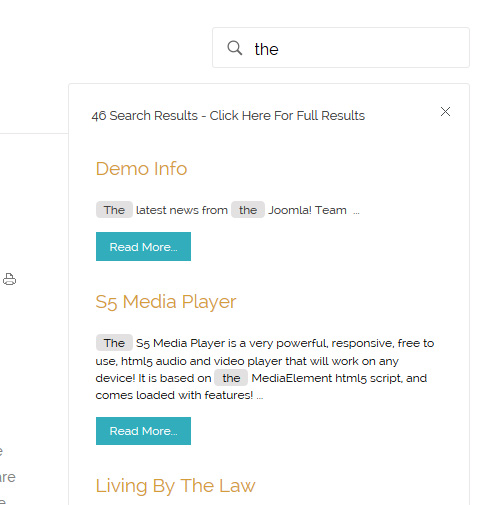
The S5 Live Search module is demo’d towards the top of this page and can be used on any Joomla template, but the specific styling shown here is for this template only.
Allow your users to search quickly and without loading or refreshing pages with our amazing ajax search module! Simply publish the module to the ‘search’ position.
I like what I see! I want to JOIN TODAY.
S5 Map it With Google
The Map it with Google module is displayed on this page. Simply enter your address and the module uses the Google API to display a map with a marker to the address. A user simply clicks the marker and they are prompted with a popup box to get directions. Clicking “Get Directions” will take you to google maps with your business address already entered so all they have to do is enter their address to get directions. You can also specify the size of the map and whether or not to enable or disable certain controls.
Floating Menu
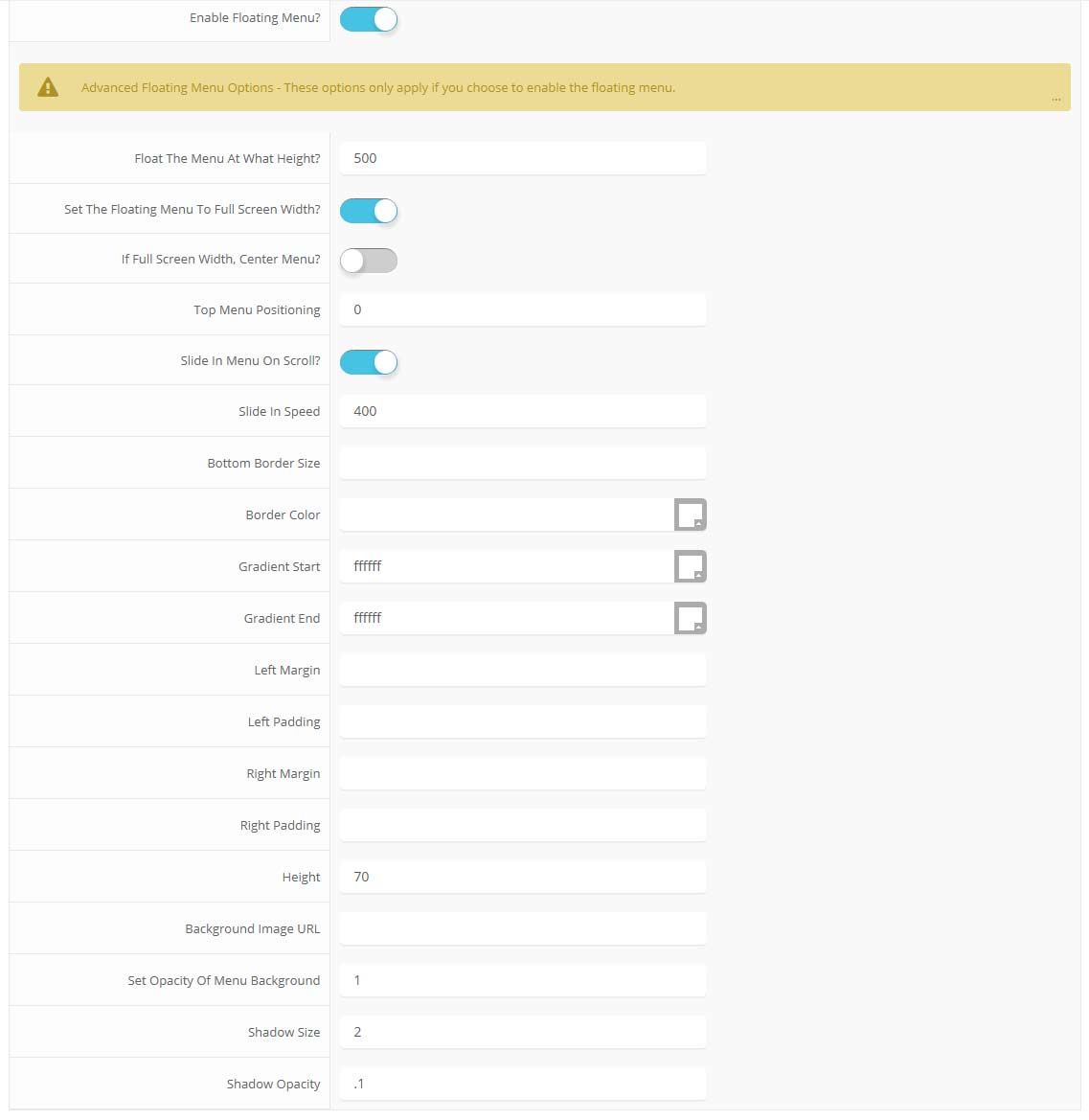
The floating menu feature is a great way for your users to easily navigate your website! The floating menu will show at the top of your browser once the screen reaches a certain point. You can determine the exact point at which this occurs via the template specific area of Vertex. NOTE: This is a Vertex addition and is not guaranteed to work with all Vertex Templates. Some custom CSS may need to be adjusted per template. This feature is not supported by IE7/8.
Features at a glance:
- Set a background image to the menu, gradient or solid color
- Set to snap or smooth scroll in
- Determine at which point as you scroll down your page that the menu drops in
- and many more features, just check out the screenshot below
Admin area of the floating menu:
Parallax Backgrounds
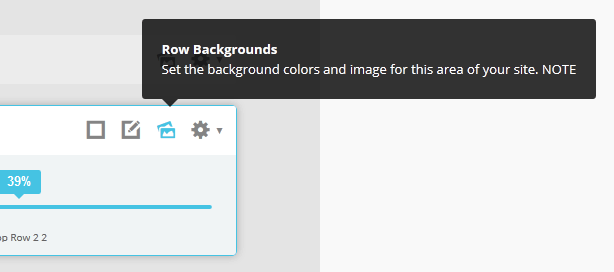
Parallax backgrounds as well as other background options are built directly into the Vertex Framework. Parallax causes the background image of an element to scroll at a different speed than your browser. For an example of this view the homepage of the Velocity template here and watch the background of the top_row1 area as you scroll down the page. This feature is found under “Backgrounds” tab in Vetex, where you can control the background for many areas of your website.
Features:
- Set the scroll speed of the images
- Set background repeat style
- Set background image size, 100%, cover, contain, etc
- Set custom backgrounds for all s5 rows in the framework.
- Enable or disable parallax on a per row basis
Admin Area Of The Backgrounds Tab:
Typography Options
Drop Caps
L orem ipsum dolor sit amet, consectetur adipiscing elit. Mauris tristique lobortis orci ac lacinia. Fusce eu purus eget diam vehicula auctor nec eu elit. Morbi consequat facilisis orci vel malesuada. Donec ultrices molestie sollicitudin. Morbi consequat facilisis orci vel malesuada. Donec ultrices molestie sollicitudin. Mauris tristique lobortis orci ac lacinia. Mauris tristique lobortis orci ac lacinia.
Apply a drop cap with a wrapping span class as follows: <span class=”firstcharacter”>L</span>orem ipsum
L orem ipsum dolor sit amet, consectetur adipiscing elit. Mauris tristique lobortis orci ac lacinia. Fusce eu purus eget diam vehicula auctor nec eu elit. Morbi consequat facilisis orci vel malesuada. Donec ultrices molestie sollicitudin. Morbi consequat facilisis orci vel malesuada. Donec ultrices molestie sollicitudin. Mauris tristique lobortis orci ac lacinia. Mauris tristique lobortis orci ac lacinia.
Apply a drop cap with a wrapping span class as follows: <span class=”firstcharacter2″>L</span>orem ipsum
Porem ipsum dolor sit amet, consectetur adipiscing elit. Mauris tristique lobortis orci ac lacinia. Fusce eu purus eget diam vehicula auctor nec eu elit. Morbi consequat facilisis orci vel malesuada. Donec ultrices molestie sollicitudin. Morbi consequat facilisis orci vel malesuada. Donec ultrices molestie sollicitudin. Mauris tristique lobortis orci ac lacinia. Mauris tristique lobortis orci ac lacinia.
Apply a drop cap with a class on a wrapping paragraph tag as follows: <p class=”drop_class”>Porem ipsum</a>
Porem ipsum dolor sit amet, consectetur adipiscing elit. Mauris tristique lobortis orci ac lacinia. Fusce eu purus eget diam vehicula auctor nec eu elit. Morbi consequat facilisis orci vel malesuada. Donec ultrices molestie sollicitudin. Morbi consequat facilisis orci vel malesuada. Donec ultrices molestie sollicitudin. Mauris tristique lobortis orci ac lacinia. Mauris tristique lobortis orci ac lacinia.
Apply a drop cap with a class on a wrapping paragraph tag as follows: <p class=”drop_class2″>Porem ipsum</a>
Social Icons
Ion Icons must be enabled to use these icons.
<a href="" class="social_icon ion-social-facebook"></a>
<a href="" class="social_icon ion-social-twitter"></a>
<a href="" class="social_icon ion-social-googleplus"></a>
<a href="" class="social_icon ion-social-rss"></a>
<a href="" class="social_icon ion-social-pinterest"></a>
<a href="" class="social_icon ion-social-twitter"></a>
<a href="" class="social_icon ion-social-googleplus"></a>
<a href="" class="social_icon ion-social-rss"></a>
<a href="" class="social_icon ion-social-pinterest"></a>
Notifications
This is a styled box. Use <div class=”black_box”>Your content goes here!</div>
This is a styled box. Use <div class=”gray_box”>Your content goes here!</div>
This is a styled box. Use <div class=”red_box”>Your content goes here!</div>
This is a styled box. Use <div class=”blue_box”>Your content goes here!</div>
This is a styled box. Use <div class=”green_box”>Your content goes here!</div>
This is a styled box. Use <div class=”yellow_box”>Your content goes here!</div>
This is a styled box. Use <div class=”orange_box”>Your content goes here!</div>
Images
This is an image with the “boxed” class applied:

This is an image with the “boxed_black” class applied:
This is an image with the “padded” class applied:
This is an image with the “full_width” class applied. This can also be done automatically in the template configuration. Be sure to review our Vertex Guide here for other full width image options.

Headings
Heading 1
Heading 2
Heading 3
Heading 4
Heading 5
Ion Icons
<div class="icon_outer_wrap">
<div class="icon_hover">
<a href="" class="ion-link icon_element"></a>
</div>
<div class="icon_non_hover">
<span class="ion-headphone icon_element"></span>
</div>
</div>
Click here for more icon examples
Dates
AUG
22
<div class="date_outer_wrap">
<div class="date_wrapper">
<div class="date_top">
AUG
</div>
<div class="date_bottom">
22
</div>
</div>
<div class="date_text_wrap">
<span class="date_text1"><a href="">Top Sample Text</a></span>
<span class="date_text2">When: August 22, 2014 at 7:00pm</span>
</div>
<div style="clear:both"></div>
</div>
Overlay

Michelle Wright
Senior Developer

Photos credits by Daniele Zedda, JohnONolan, Daniele Zedda, Daniele Zedda, AllansBrain, rolands.lakis
Example of code used above. Notice on the first DIV there is a “four”. You can enter one, two, three, four, five and six depending on how many team members you want on one row (Be sure to keep that space before the number too):
<div class=”overlay_outter four”>
<div class=”overlay_inner”>
<div class=”overlay_hover_outer”>
<div class=”overlay_hover_inner”>
<div class=”overlay_socialicons”>
<a class=”overlay_facebook” href=”https://www.facebook.com/shape5.templates” target=”_blank”></a>
<a class=”overlay_twitter” href=”https://twitter.com/shape_5″ target=”_blank”></a>
</div>
</div>
<img src=”http://www.shape5.com/demo/images/general/team/team1.jpg” alt=”team1″/>
</div>
<br>
Mike Summerfield
<br>
<span style=”color:#a8a8a8;”>CEO/Owner</span>
<br>
</div>
</div>
Misc
<a> With readon class applied:
<span> With uppercase class applied:
uppercase
<span> With lowercase class applied:
lowercase
This is a sample blockquote. Use <blockquote><p>Your content goes here!</p></blockquote> to create a blockquote.
This is a sample code div. Use <div class=”code”>Your content goes here!</div> to create a code div.
#s5_code { width: 30px; color: #fff; line-height: 45px; }
- This is an Ordered List
- Congue Quisque augue elit dolor nibh.
- Condimentum elte quis.
- Opsum dolor sit amet consectetuer.
- This is an Unordered List
- Congue Quisque augue elit dolor nibh.
- Condimentum elte quis.
- Opsum dolor sit amet consectetuer.
- This is an Unordered List with class ul_arrow
- Congue Quisque augue elit dolor nibh.
- Condimentum elte quis.
- Opsum dolor sit amet consectetuer.
- This is an Unordered List with class ul_star
- Congue Quisque augue elit dolor nibh.
- Condimentum elte quis.
- Opsum dolor sit amet consectetuer.
- This is an Unordered List with class ul_bullet
- Congue Quisque augue elit dolor nibh.
- Condimentum elte quis.
- Opsum dolor sit amet consectetuer.
The following list will support plain text such as numbers of ion icons, class=”ul_circle_content”:
- 01Lorem ipsum dolor sit amet, consectetur adipiscing elit. Sed ut mattis quam. Suspendisse tempor mollis porta. Quisque consequat justo risus, et venenatis erat consectetur sit amet. Curabitur varius tortor metus, non convallis felis fermentum sed. Nam varius justo nulla, et ultricies augue venenatis ut. Proin tempor aliquam dapibus. Pellentesque euismod vehicula est, a euismod lacus feugiat sit amet.
- 02Lorem ipsum dolor sit amet, consectetur adipiscing elit. Sed ut mattis quam. Suspendisse tempor mollis porta. Quisque consequat justo risus, et venenatis erat consectetur sit amet. Curabitur varius tortor metus, non convallis felis fermentum sed. Nam varius justo nulla, et ultricies augue venenatis ut. Proin tempor aliquam dapibus. Pellentesque euismod vehicula est, a euismod lacus feugiat sit amet.
- 03Lorem ipsum dolor sit amet, consectetur adipiscing elit. Sed ut mattis quam. Suspendisse tempor mollis porta. Quisque consequat justo risus, et venenatis erat consectetur sit amet. Curabitur varius tortor metus, non convallis felis fermentum sed. Nam varius justo nulla, et ultricies augue venenatis ut. Proin tempor aliquam dapibus. Pellentesque euismod vehicula est, a euismod lacus feugiat sit amet.
- Lorem ipsum dolor sit amet, consectetur adipiscing elit. Sed ut mattis quam. Suspendisse tempor mollis porta. Quisque consequat justo risus, et venenatis erat consectetur sit amet. Curabitur varius tortor metus, non convallis felis fermentum sed. Nam varius justo nulla, et ultricies augue venenatis ut. Proin tempor aliquam dapibus. Pellentesque euismod vehicula est, a euismod lacus feugiat sit amet.
<li><span class="circle_item">01</span>Lorem ipsum dolor sit amet,
consectetur adipiscing elit. Sed ut mattis quam. Suspendisse tempor mollis porta.
Quisque consequat justo risus, et venenatis erat consectetur sit amet. Curabitur
varius tortor metus, non convallis felis fermentum sed. Nam varius justo nulla,
et ultricies augue venenatis ut. Proin tempor aliquam dapibus. Pellentesque
euismod vehicula est, a euismod lacus feugiat sit amet.</li>
<li><span class="circle_item"><i class="ion-star"></i></span>Lorem
ipsum dolor sit amet, consectetur adipiscing elit. Sed ut mattis quam.
Suspendisse tempor mollis porta. Quisque consequat justo risus, et venenatis
erat consectetur sit amet. Curabitur varius tortor metus, non convallis felis
fermentum sed. Nam varius justo nulla, et ultricies augue venenatis ut. Proin
tempor aliquam dapibus. Pellentesque euismod vehicula est, a euismod lacus
feugiat sit amet.</li>
ipsum dolor sit amet, consectetur adipiscing elit. Sed ut mattis quam.
Suspendisse tempor mollis porta. Quisque consequat justo risus, et venenatis
erat consectetur sit amet. Curabitur varius tortor metus, non convallis felis
fermentum sed. Nam varius justo nulla, et ultricies augue venenatis ut. Proin
tempor aliquam dapibus. Pellentesque euismod vehicula est, a euismod lacus
feugiat sit amet.</li>
The following list will support lists up to number 9, add the following class to the UL wrapping the below LI elements, class=”ul_numbers”:
- This is a sample styled number list <li class=”li_number1″>Your content goes here!</li>
- This is a sample styled number list <li class=”li_number2″>Your content goes here!</li>
- This is a sample styled number list <li class=”li_number3″>Your content goes here!</li>
- This is a sample styled number list <li class=”li_number4″>Your content goes here!</li>
Price Table
Basic
$49/per month
Standard
$79/per month
Premium
$99/per month
To use the price table on your site grab the following example code below and add to your site. The price table is fully responsive and can display up to 7 price columns. Once you have determined the number of columns you will be using set the wrapper div to the number of columns that you’ve added. You can use the wrapping classes of “s5_pricetable_1” to “s5_pricetable_7”.
<div class=”s5_pricetable_3″>
<div class=”s5_pricetable_column”>
<div class=”s5_pricetable_column_padding”>
<div class=”s5_title”>Basic</div>
<span class=”dollarsign”>$</span><span class=”price”>49</span><span class=”month”>/per month</span>
<div class=”s5_options”>
Unlimited Space & Traffic<br>
99.9% Server Uptime<br>
24/7 Customer Care<br>
30 Days Money Back<br><br>
</div>
<div class=”s5_horizontalrule”></div>
<div class=”s5_buttoncenter”><a class=”button s5_pricetable” href=”#”>Choose</a></div>
</div>
</div>
<div class=”s5_pricetable_column recommended”>
<div class=”s5_pricetable_column_padding”>
<div class=”s5_title”>Standard</div>
<span class=”dollarsign”>$</span><span class=”price”>79</span><span class=”month”>/per month</span>
<div class=”s5_options”>
Unlimited Space & Traffic<br>
99.9% Server Uptime<br>
24/7 Customer Care<br>
30 Days Money Back<br>
FREE Domain Name<br>
Personal Concierge
</div>
<div class=”s5_horizontalrule”></div>
<div class=”s5_buttoncenter”><a class=”button s5_pricetable” href=”#”>Choose</a></div>
</div>
</div>
<div class=”s5_pricetable_column”>
<div class=”s5_pricetable_column_padding”>
<div class=”s5_title”>Premium</div>
<span class=”dollarsign”>$</span><span class=”price”>99</span><span class=”month”>/per month</span>
<div class=”s5_options”>
Unlimited Space & Traffic <br>
99.9% Server Uptime<br>
24/7 Customer Care<br>
30 Days Money Back<br>
FREE Domain Name
</div>
<div class=”s5_horizontalrule”></div>
<div class=”s5_buttoncenter”><a class=”button s5_pricetable” href=”#”>Choose</a></div>
</div>
</div>
<div style=”clear:both;”></div>
</div>
Responsive YouTube and Vimeo Videos
Make any Youtube, Vimeo, etc video you embed to your site work with responsive by wrapping with a DIV with a class of “s5_video_container”. The below Youtube Video will shrink when the area its contained in gets too small for it:
Tool Tips
Note – The tool tips script is by default disabled. If you wish to use it you must enable this script in the template's configuration area. This also includes site shaper installations.
Demo 1:

Demo 2:
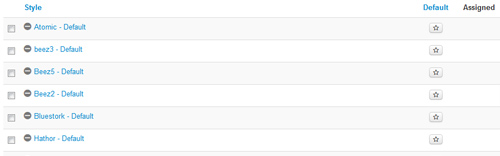
This template comes loaded with options that you can use to customize your site exactly how you want it. Here's how to get to these custom settings:
The Template’s Settings
 I like what I see! I want to JOIN TODAY.