
News & Stories - Page 4 of 8 - AURA
Who is a Refugee

Who is a Refugee

News & Stories

Who is a Refugee

Although the concept of seeking refuge in a Holy place has existed for thousands of years, the current term of refugee stems from the conflicts, hostilities, and mass forced migrations of the 20th century.

The United Nations Convention Relating to the Status of Refugees of 1951 clearly established a definition of a refugee in response to the many people affected by World War II. The definition of a legal refugee was subsequently expanded by the Convention’s 1967 Protocol and by regional conventions in Africa (1969) and Latin America (1984).

{s5_media_player media= download=[disabled] video_mp4=[http://www.auraforrefugees.org/whoisarefugee.mp4]}

A refugee is a person who is outside their country of origin because they have suffered persecution and cannot safely return home because of these circumstances. In order to qualify as a refugee a person must have endured persecution on account of:

• Race,

• Religion,

• Nationality,

• Political opinion,

• Being a member of a persecuted social group.

This is a simplified version of the UNHCR definition of who a refugee is; please see the UNHCR site for the complete legal understanding of refugee conditions.

Today war, famine, civil unrest, economic and environmental disasters have caused unprecedented numbers of displaced people across the globe. UNHCR has identified three durable solutions for refugees: voluntary repatriation, local integration, and resettlement to a third country. Through the third solution, resettlement, AURA works determinedly to help as many refugees as possible.

It is important to understand not everyone who leaves their country of origin will be classified as a refugee. Migrants, especially economic migrants, are people who choose to move in order to improve their and their family’s future prospects. Refugees are forced to move in order to save their lives or preserve their freedom. Refugees have no protection from their own governments and it is often their own governments that threaten to persecute them.

To learn more about Refugee Sponsorship, the program that AURA work within, please click here: What is Private Sponsorship of Refugees (PSR)
S5 Live Search

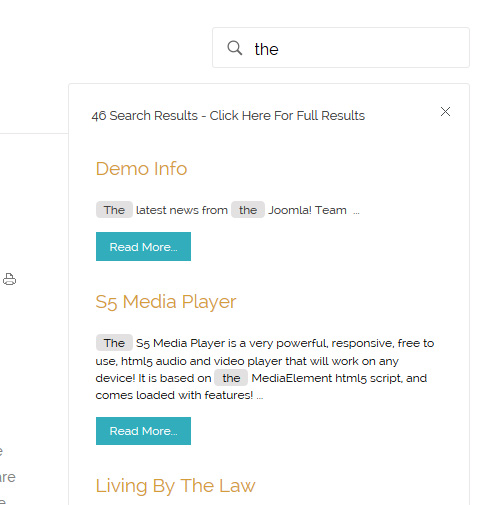
The S5 Live Search module is demo’d towards the top of this page and can be used on any Joomla template, but the specific styling shown here is for this template only.

Allow your users to search quickly and without loading or refreshing pages with our amazing ajax search module! Simply publish the module to the ‘search’ position.

I like what I see! I want to JOIN TODAY.

404 Error Page

404

Opps, sorry we can’t find that page!

Either something went wrong or the page doesn’t exist anymore.

Home Page

Pricing Table

Fast, Secure, reliable services
trusted by millions.

Starting at:

$49/per month

Signup

24 Day Money Back Gaurantee

We accept all major credit cards. No hidden fees.

Basic

$49/per month

Unlimited Space & Traffic
99.9% Server Uptime
24/7 Customer Care
30 Days Money Back

Premium

$99/per month

Unlimited Space & Traffic
99.9% Server Uptime
24/7 Customer Care
30 Days Money Back
FREE Domain Name

All Plans Include

  • Free Email Addresses
  • 24/7 security monitoring
  • Flexible, easy-to-use control panel
  • Free Month of Support
  • 10 Fotolia Photo Credits
  • *Money-back guarantee

Fusce ac eleifend erat, cursus pretium ante. Mauris euismod luctus libero ac rutrum. Morbi ullamcorper, mauris et dapibus accumsan, turpis massa ornare metus, eget commodo neque lacus sit amet erat. Vestibulum tempus, mi eget condimentum cursus, augue urna congue justo, a accumsan nunc erat eget leo. Proin sollicitudin tortor et nibh fringilla hendrerit. Praesent vel ante suscipit nisl hendrerit eleifend. Praesent a aliquet purus.

Signup Today

To use the price table on your site grab the following example code below and add to your site. The price table is fully responsive and can display up to 7 price columns. Once you have determined the number of columns you will be using set the wrapper div to the number of columns that you’ve added. You can use the wrapping classes of “s5_pricetable_1” to “s5_pricetable_7”.

<div class=”s5_pricetable_3″>

<div class=”s5_pricetable_column”>
<div class=”s5_pricetable_column_padding”>
<div class=”s5_title”>Basic</div>

<span class=”dollarsign”>$</span><span class=”price”>49</span><span class=”month”>/per month</span>

<div class=”s5_options”>
Unlimited Space & Traffic<br>
99.9% Server Uptime<br>
24/7 Customer Care<br>
30 Days Money Back<br><br>
</div>

<div class=”s5_horizontalrule”></div>
<div class=”s5_buttoncenter”><a class=”button s5_pricetable” href=”#”>Choose</a></div>

</div>
</div>

<div class=”s5_pricetable_column recommended”>
<div class=”s5_pricetable_column_padding”>
<div class=”s5_title”>Standard</div>

<span class=”dollarsign”>$</span><span class=”price”>79</span><span class=”month”>/per month</span>

<div class=”s5_options”>
Unlimited Space & Traffic<br>
99.9% Server Uptime<br>
24/7 Customer Care<br>
30 Days Money Back<br>
FREE Domain Name<br>
Personal Concierge
</div>

<div class=”s5_horizontalrule”></div>
<div class=”s5_buttoncenter”><a class=”button s5_pricetable” href=”#”>Choose</a></div>

</div>
</div>

<div class=”s5_pricetable_column”>
<div class=”s5_pricetable_column_padding”>
<div class=”s5_title”>Premium</div>

<span class=”dollarsign”>$</span><span class=”price”>99</span><span class=”month”>/per month</span>

<div class=”s5_options”>
Unlimited Space & Traffic <br>
99.9% Server Uptime<br>
24/7 Customer Care<br>
30 Days Money Back<br>
FREE Domain Name

</div>

<div class=”s5_horizontalrule”></div>
<div class=”s5_buttoncenter”><a class=”button s5_pricetable” href=”#”>Choose</a></div>

</div>
</div>

<div style=”clear:both;”></div>
</div>

FAQs

Find Our Most Frequent Questions Below

Fusce ac eleifend erat, cursus pretium ante. Mauris euismod luctus libero ac rutrum. Morbi ullamcorper, mauris et dapibus accumsan, turpis massa ornare metus, eget commodo neque lacus sit amet erat. Vestibulum tempus, mi eget condimentum cursus, augue urna congue justo, a accumsan nunc erat eget leo. Proin sollicitudin tortor et nibh fringilla hendrerit. Praesent vel ante suscipit nisl hendrerit eleifend. Praesent a aliquet purus.

Contact Us

Product Related Questions


– When will I receive my products?


Lorem ipsum dolor sit amet, consectetur adipiscing elit. Donec mattis gravida justo, a rhoncus sem volutpat in. Pellentesque lacinia lacinia ligula, eget tempor elit sagittis non. Vestibulum pellentesque lorem nec diam interdum pellentesque.


– Where are your products manufactured?


Etiam tempus facilisis ultrices. Nam adipiscing nunc nec est dapibus, eget eleifend velit mattis. Curabitur facilisis a rhoncus sem volutpat in condimentum augue at viverra. Ut ut tortor feugiat, dignissim nulla non, venenatis leo.


– Is there a warranty on your products?


Morbi nunc nunc, elementum quis tortor et, feugiat pharetra eros. Mauris mattis purus at lobortis auctor. Nullam eros velit, laoreet vel libero posuere, a rhoncus sem volutpat in eleifend ornare libero. Cras iaculis interdum dui.

Customer Support Questions


– Where is your company located?


Lorem ipsum dolor sit amet, consectetur adipiscing elit. Donec mattis gravida justo, a rhoncus sem volutpat in. Pellentesque lacinia lacinia ligula, eget tempor elit sagittis non. Vestibulum pellentesque lorem nec diam interdum pellentesque.


– What are your hours of operation?


Etiam tempus facilisis ultrices. Nam adipiscing nunc nec est dapibus, eget eleifend velit mattis. Curabitur facilisis a rhoncus sem volutpat in condimentum augue at viverra. Ut ut tortor feugiat, dignissim nulla non, venenatis leo.


– How can I submit for a return?


Morbi nunc nunc, elementum quis tortor et, feugiat pharetra eros. Mauris mattis purus at lobortis auctor. Nullam eros velit, laoreet vel libero posuere, a rhoncus sem volutpat in eleifend ornare libero. Cras iaculis interdum dui.

Still need help? Check out our forum and tutorials section of our site

404 Error

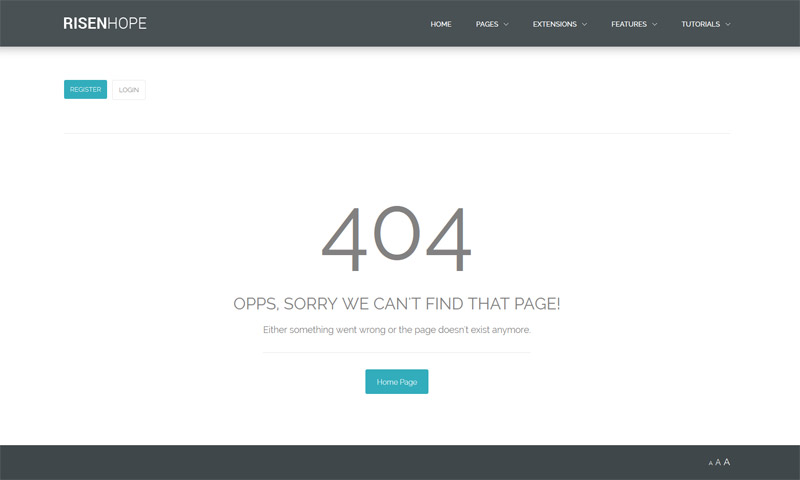
This design comes with a match 404 page for users who reach an unrecognised site url. Below is a screenshot of that link or you can see it live here.

Shape5 Vertex uses articles to display a 404 page rather than a hard coded php file that’s hard to modify, like many other designs do. This means you can modify the look or wording of the page very easy without having to modify a file, and it keeps all of your site navigation in tact for ease of use for your site viewers since it uses the template and not an external file. It’s as simple as editing an article through the CMS to make any desired changes, or simply leave it as shown! Our site shapers come pre-packaged with the custom 404 page article. If you are setting up a brand new site without a site shaper the easy follow instructions are below the screenshot on this page.

Setup Instructions

  • These instructions are for non site shaper installs. If you’re installing with a shaper just make sure to leave the article titled “404 Error Page” published and you’re done!
  • If you are installing a fresh installation with no sample data simply create an article and make sure it’s titled “404 Error Page”. It must be given this name for the Vertex framework to identify the page needed to be used.
  • You can put any content that you want on this new article, or we’ve provided the code used on this demo below.
  • Save the article to any category, just make sure it’s published.
  • That’s it, you’re done! The site will now redirect to this article when ever an unrecognised url is detected.

The Code Used For This Demo

<div id="wrap_404">
<h3 class="title_404">404</h3>
<span class="line_1_404">Opps, sorry we can’t find that page!</span>
<br />
<span class="line_2_404">Either something went wrong or the page doesn’t exist
anymore.</span>
<br />
<a href="" class="readon">Home Page</a>
</div>

About Us

Who We Are

Lorem ipsum dolor sit amet, consectetur adipiscing elit. Donec mattis gravida justo, a rhoncus sem volutpat in. Pellentesque lacinia lacinia ligula, eget tempor elit sagittis non. Vestibulum pellentesque lorem nec diam interdum pellentesque. Etiam tempus facilisis ultrices. Nam adipiscing nunc nec est dapibus, eget eleifend velit mattis.

Curabitur facilisis condimentum augue at viverra. Ut ut tortor feugiat, dignissim nulla non, venenatis leo. Mauris elit ante, gravida sed auctor sed, rutrum a eros. Quisque nulla orci, posuere et rutrum vitae, commodo ac dolor. Cras iaculis interdum dui, vel faucibus nisl mattis tempor. Maecenas at augue placerat massa convallis.

See Our Previous Work

Fusce ac eleifend erat, cursus pretium ante. Mauris euismod luctus libero ac rutrum. Morbi ullamcorper, mauris et dapibus accumsan, turpis massa ornare metus, eget commodo neque lacus sit amet erat. Vestibulum tempus, mi eget condimentum cursus, augue urna congue justo, a accumsan nunc erat eget leo. Proin sollicitudin tortor et nibh fringilla hendrerit. Praesent vel ante suscipit nisl hendrerit eleifend. Praesent a aliquet purus.

See Examples

See How It Works

Lorem ipsum dolor sit amet, consectetur adipiscing elit. Donec mattis gravida justo, a rhoncus sem volutpat in. Pellentesque lacinia lacinia ligula, eget tempor elit sagittis non. Vestibulum pellentesque lorem nec diam interdum pellentesque. Etiam tempus facilisis ultrices. Nam adipiscing nunc nec est dapibus, eget eleifend velit mattis.

Experience Matters

Pellentesque lacinia lacinia ligula, eget tempor elit sagittis non. Vestibulum pellentesque lorem nec diam interdum pellentesque. Etiam tempus facilisis ultrices. Nam adipiscing nunc nec est dapibus, eget eleifend velit mattis. Lorem ipsum dolor sit amet, consectetur adipiscing elit. Donec mattis gravida justo, a rhoncus sem volutpat in.

S5 Map it With Google

The Map it with Google module is displayed on this page. Simply enter your address and the module uses the Google API to display a map with a marker to the address. A user simply clicks the marker and they are prompted with a popup box to get directions. Clicking “Get Directions” will take you to google maps with your business address already entered so all they have to do is enter their address to get directions. You can also specify the size of the map and whether or not to enable or disable certain controls.

Floating Menu

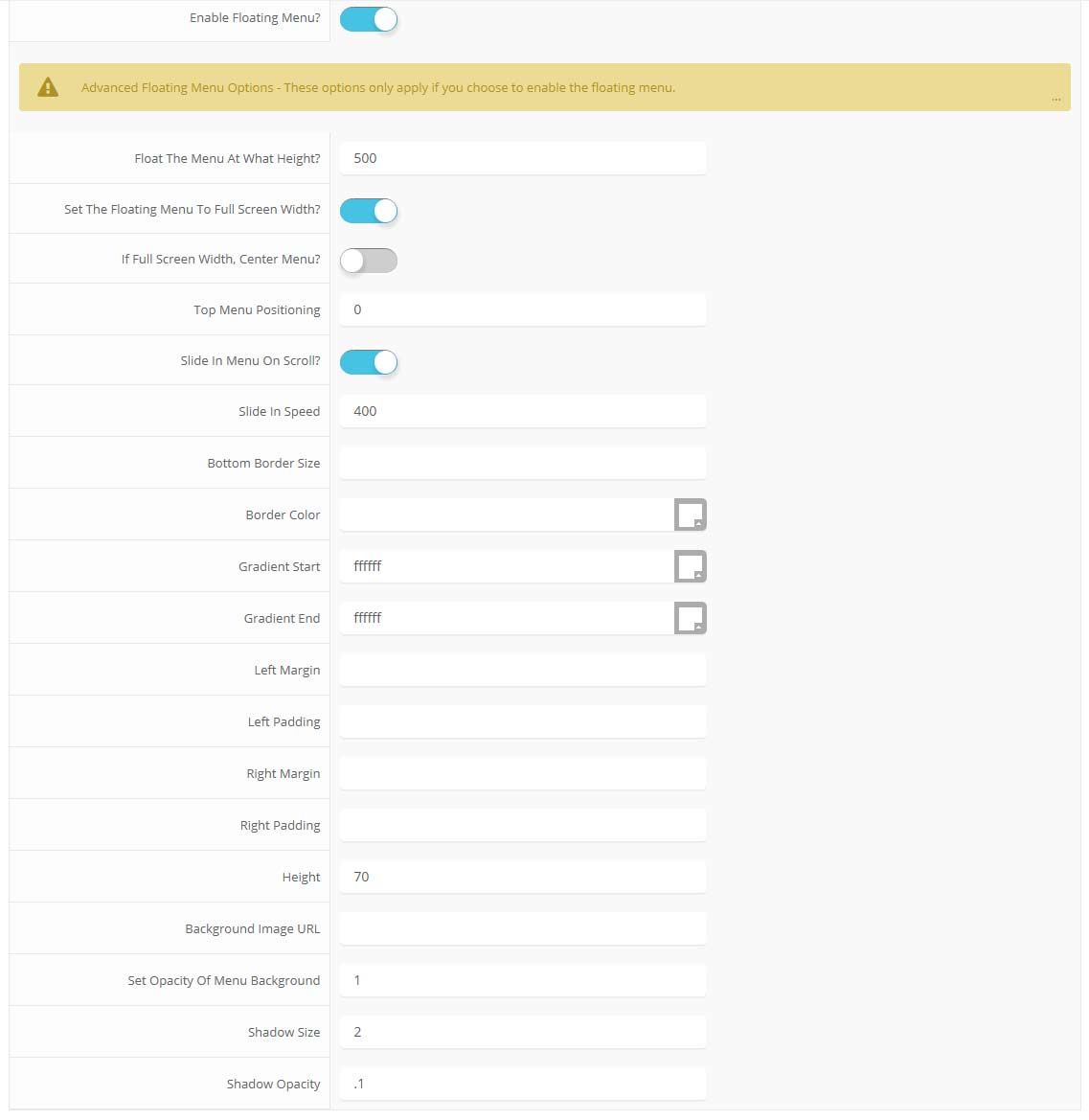
The floating menu feature is a great way for your users to easily navigate your website! The floating menu will show at the top of your browser once the screen reaches a certain point. You can determine the exact point at which this occurs via the template specific area of Vertex. NOTE: This is a Vertex addition and is not guaranteed to work with all Vertex Templates. Some custom CSS may need to be adjusted per template. This feature is not supported by IE7/8.

Features at a glance:

  • Set a background image to the menu, gradient or solid color
  • Set to snap or smooth scroll in
  • Determine at which point as you scroll down your page that the menu drops in
  • and many more features, just check out the screenshot below

Admin area of the floating menu:

parallax menu admin